
Select team information on statement template
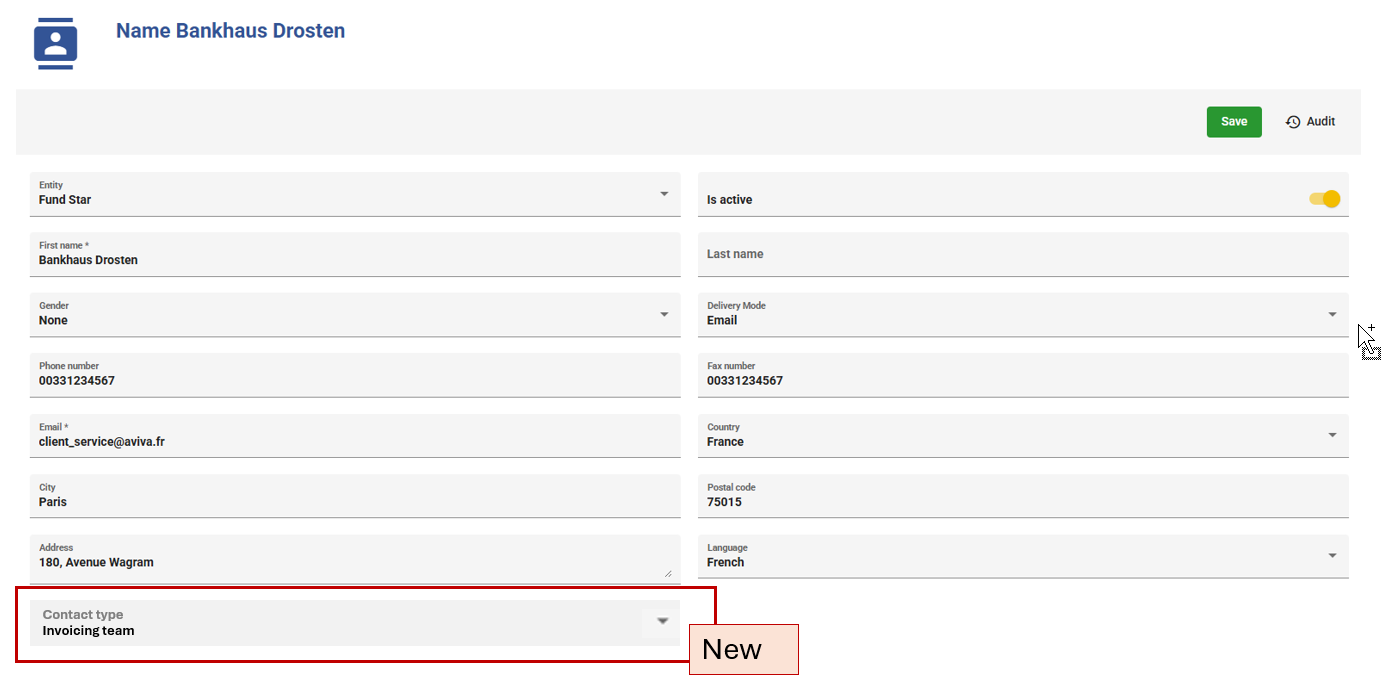
Contact Type Field in Contacts Module
Purpose / Description
Enable categorization of contacts by introducing a "Contact Type" field in the Contacts module. This lays the foundation for filtering contacts by role/purpose across the system (e.g., filtering "Team Contact" type contacts in the Agreements module).
Use Case
| As a user , I want to assign a "Contact Type" to each contact in the Contacts module, so that contacts can be categorized (e.g., "Invoicing team"). | |
| Primary Actor(s) | |
| Stakeholders and Interest | |
| Trigger | A user creates a new contact or edits an existing contact in the Contacts module. |
| Pre-condition(s) |
|
| Post-condition(s) |
|
| Main success scenario |
1. User navigates to the Contacts module. 2. User creates a new contact or opens an existing one for editing. 3. User selects a value from the "Contact Type" dropdown . 4. User completes other required contact fields (First Name, Last Name, Phone, Email, etc.). 5. User saves the contact. 6. System stores the contact with the selected Contact Type. |
| Extensions |
|
| Exception scenarios |
|
| Special requirements |
|
| Open questions |
|
Mockup
Functional Requirements
| Title | Description |
| FR-1.1: Add Contact Type field | System shall provide a "Contact Type" field on the contact creation/edit form. |
| FR-1.2: Predefined value | System shall include "Invoicing Team" as an initial selectable value. |
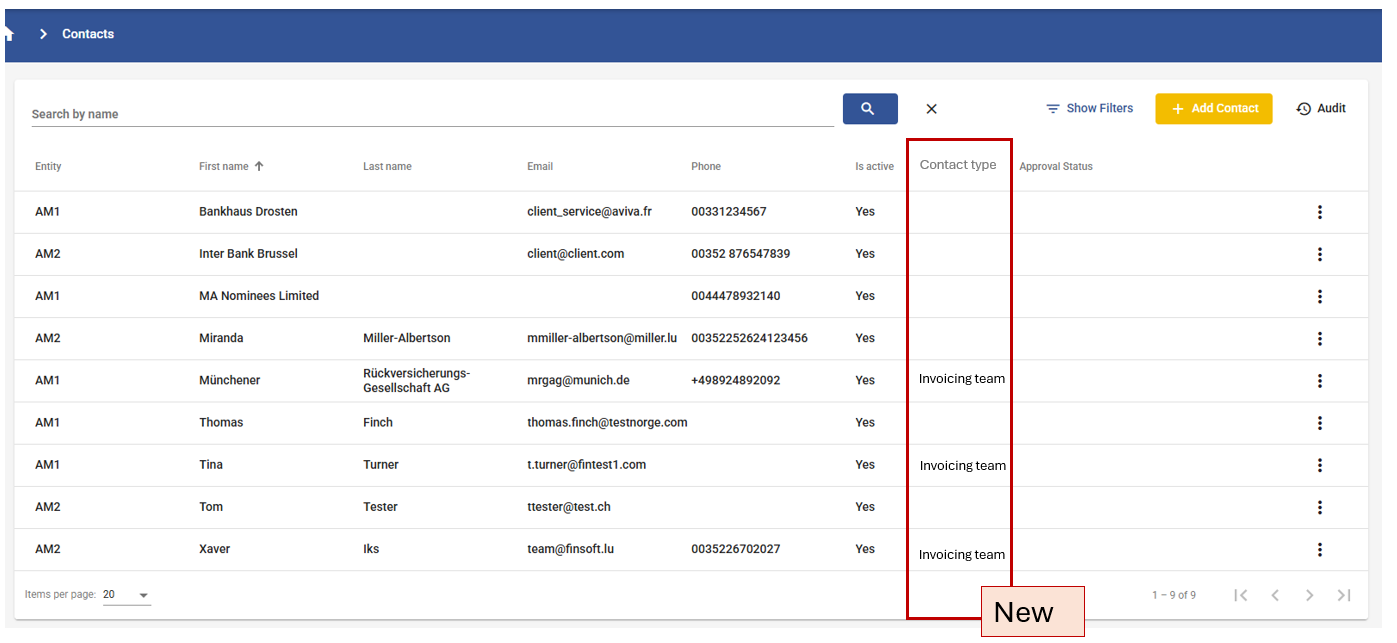
| FR-1.3: Display Contact Type field in Contact list | System shall include the "Contact Type" field in the Contact list view and is available for search/filter |
Field level specification
| Label |
Mandatory |
Editable | Data Type | Value set | Default | Data sample |
| Contact Type | No | Yes | Single-select dropdown | Invoicing Team | None (blank/unselected) | "Invoicing Team" |
Team Contact Dropdown in Agreements Module
Purpose / Description
Allow users to select a "Team Contact" (from contacts flagged as Contact Type = "Invoicing Team") within the "Invoice Contact" section of an agreement's Details tab, linking that contact to the agreement for later use in invoice generation.
Use Case
| As a user creating or editing an agreement, I want to be able to select an internal contact, so that the recipient knows to who should contact when receiving the invoice | |
| Primary Actor(s) | |
| Stakeholders and Interest | |
| Trigger | A user creates a new agreement or edits an existing agreement and navigates to the Details tab. |
| Pre-condition(s) |
|
| Post-condition(s) |
|
| Main success scenario |
1. User opens a new or existing agreement. 2. User navigates to the Details tab. 3. User scrolls to the "Invoice Contact" section. 4. System displays a "Internal Contact" dropdown field, populated with all contacts where Contact Type = "Invoicing Team". 5. User selects a contact from the dropdown. 6. User saves the agreement. 7. System stores the link between the agreement and the selected Invoicing Team Contact.
|
| Extensions |
|
| Exception scenarios |
|
| Special requirements |
|
| Open questions |
|
Mockup
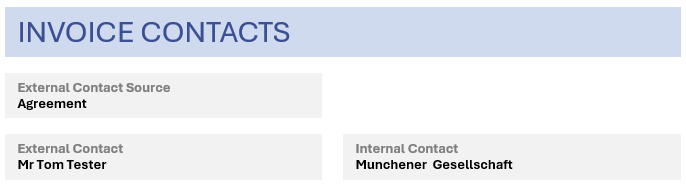
- When Agreement is selected:
- When Counterparty is selected:
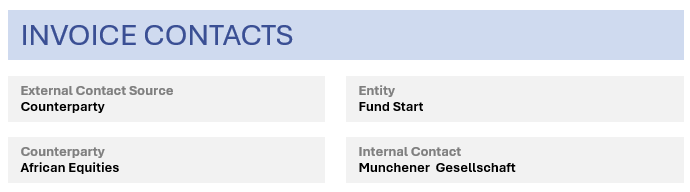
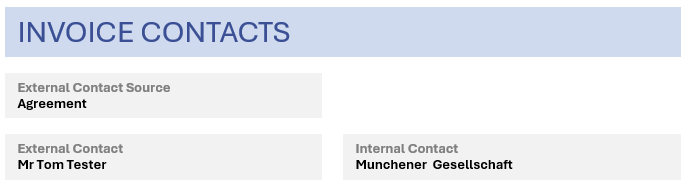
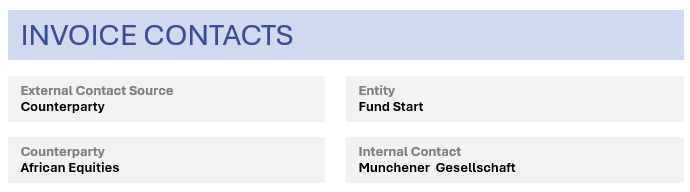
Functional Requirements
| Title | Description |
| FR-2.1: Add Internal Contact dropdown | System shall add an "Internal Contact" dropdown field within the "Invoice Contact" section of the agreement Details tab. |
| FR-2.2: Filtered population | Dropdown shall be populated exclusively with contacts where Contact Type = "Invoicing Team". |
| FR-2.3: Editable post-creation | Users shall be able to change the selected Internal Contact after the agreement is created. |
| FR-2.4: Scope by Entity | The " Internal Contact" dropdown should only display the contacts of the Entity's agreement |
| FR-2.5: Rename the existing fields |
Rename:
|
Field level specification
| Label |
Mandatory |
Editable | Data Type | Value set | Default | Data sample |
| Internal Contact | No | Yes | Single-select dropdown | Dynamic — all contacts where Contact Type = "Invoicing Team" of the Entity | None (blank/unselected) |
"Invoicing Team" |
Placeholders for Contact Details
Purpose / Description
Create system placeholders representing Invoicing Team Contact attributes (First Name, Last Name, Phone Number, Email) so these values can be dynamically inserted into invoice templates during document generation.
Use Case
| As a system user, I want to create placeholders for contacts attributes, so these values can be dynamically inserted into invoice templates during document generation | |
| Primary Actor(s) | |
| Stakeholders and Interest | |
| Trigger | A user sets up or updates invoice templates and needs to insert dynamic contact fields. |
| Pre-condition(s) |
|
| Post-condition(s) |
|
| Main success scenario |
1. Developer defines new placeholder keys within the placeholder configuration (e.g., 2. Placeholders are registered in the system's placeholder library/catalog. 3. Placeholders are made selectable within the Template Settings UI (see US-4). 4. At generation time, system resolves each placeholder using the Internal Contact linked to the agreement (from US-2).
|
| Extensions | 4a. No Internal Contact is linked to the agreement → placeholder resolves to blank |
| Exception scenarios |
|
| Special requirements |
|
| Open questions |
|
Mockup
Functional Requirements
| Title | Description |
| FR-3.1: Create placeholders | System shall provide four new placeholders: First Name, Last Name, Phone Number, Email — sourced from the Internal Contact linked to the agreement. |
| FR-3.2: Placeholder resolution | System shall resolve placeholders at document generation time using the Internal Contact reference stored on the agreement. |
| FR-3.3: Fallback handling | System shall apply a fallback blank when no Internal Contact is linked. |
| FR-3.4: Reusability | Placeholders shall be usable across both PDF and ZUGFeRD generation processes. |
Field level specification
| Placeholder Label |
Mandatory |
Editable | Data Type | Default | Data sample |
| Invoicing Team – First Name | No | Yes | Text | Blank |
"Invoicing" |
| Invoicing Team – Last Name | No | Yes | Text | Blank |
"Team" |
| Invoicing Team – Phone Number | No | Yes | Text | Blank |
"+49 89 2489 2092" |
| Invoicing Team – Email | No | Yes | Text | Blank |
Placeholder Insertion in Entity Template Settings
Purpose / Description
Allow administrators to insert the new Contact placeholders (US-3) into the correct section of each entity's invoice template within the Entities module's Template Settings, so the values render correctly in the generated document layout.
Use Case
| As a user, I want to place the new Contact placeholders into the correct section of the entity's template settings, so that they render in the right position on generated invoices. | |
| Primary Actor(s) | |
| Stakeholders and Interest | |
| Trigger | A system configurator opens Template Settings for a specific entity to design or update the invoice layout. |
| Pre-condition(s) |
|
| Post-condition(s) |
|
| Main success scenario |
1. User navigates to Entities module → selects an entity → opens Template Settings. 2. User locates the relevant section of the template (e.g., "Right" box). 3. User inserts the placeholders: First Name, Last Name, Phone Number, Email — in the desired order/format. 4. User saves the template settings. 5. System stores the updated template layout for that entity. |
| Extensions | 3a. Administrator formats placeholders with static labels or line breaks (e.g., "T {{phone}}", "E {{email}}") matching the attachment's layout style. |
| Exception scenarios |
|
| Special requirements |
|
| Open questions |
|
Mockup
Functional Requirements
| Title | Description |
| FR-4.1: Placeholder availability in Template Settings | System shall make the four Contact placeholders selectable/insertable within an entity's Template Settings UI. |
| FR-4.2: Section-level placement | User shall be able to place placeholders within the specific target section (e.g., "Right" box) of the template. |
| FR-4.3: Per-entity configuration | Template placeholder configuration shall be stored and applied independently per entity. |
| FR-4.4: Validation | System shall validate placeholder syntax before saving template changes. |
Data Population in Generated PDF and ZUGFeRD Invoices
Purpose / Description
Ensure that when a PDF or ZUGFeRD invoice is generated, the system automatically resolves and populates the Team Contact's First Name, Last Name, Phone Number, and Email into the invoice using the placeholders configured in the entity's template — matching the existing layout/format.
Use Case
| As a user, I want to place the new Contact placeholders into the correct section of the entity's template settings, so that they render in the right position on generated invoices. | |
| Primary Actor(s) | |
| Stakeholders and Interest | |
| Trigger | A user (or an automated process) generates a PDF and/or ZUGFeRD invoice for an agreement. |
| Pre-condition(s) |
|
| Post-condition(s) |
|
| Main success scenario |
1. User triggers invoice generation (PDF and/or ZUGFeRD) for a given agreement. 2. System retrieves the agreement's linked Team Contact. 3. System resolves each placeholder (First Name, Last Name, Phone, Email) using that contact's data. 4. System renders the PDF with resolved values in the correct template section. 5. System generates the ZUGFeRD XML with corresponding structured contact data (if applicable per ZUGFeRD schema). 6. System outputs the final invoice document(s) to the user/downstream process. |
| Extensions |
|
| Exception scenarios |
|
| Special requirements |
|
| Open questions |
|
Mockup
Functional Requirements
| Title | Description |
| FR-5.1: PDF population | System shall populate resolved Team Contact data into the PDF at the placeholder locations defined in the entity's template. |
| FR-5.2: ZUGFeRD structured population | System shall populate the equivalent structured contact fields in the ZUGFeRD XML, per the applicable ZUGFeRD profile schema. |
| FR-5.3: Consistency | Data shown in the PDF visual layer shall match the data embedded in the ZUGFeRD structured layer. |
| FR-5.4: Fallback handling | System shall apply the defined fallback behavior when no Team Contact is available. |